Product Super Sidebar for Advance Search with Parent Children Tree

Advance Search, Advance Filter with Parent Children Tree. Easy to navigator and browser any data. Support list, kanban, pivot, graph view.

!This moduld Do Need extra paid Apps Click to download.

Key features:
  • Easy to make custom parent children tree for and data.
  • Easy to show custom parent children tree for tree, kanban, pivot, graph view.
  • Product navigate by category or type is ready. Click to download.
  • Account chart navigate by type is ready. Click to download.
  • Contacts navigate by company is ready. Click to download.
  • Sale order navigate by partner and channel is ready. Click to download.
  • Purchase order navigate by partner is ready. Click to download.
  • HR employee navigate by department is coming soon.
  • It is so easy to customize, you can use it in anywhere in odoo.


So Easy to navigator and search any data.

Product by category or type in kanban view


How to use! This app do need extra module. The price already included

1. Install zTree widget Click to download.

2. Install app_web_superbar. Important! Reboot odoo after installed.

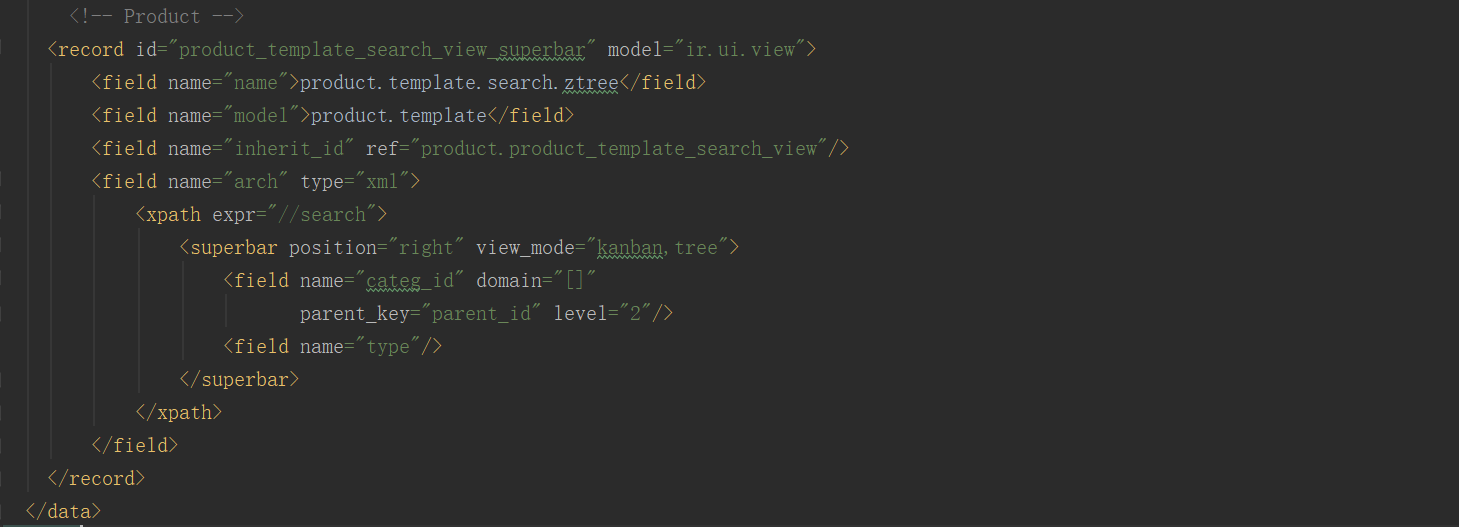
3. If you want to customize, Use follow param to setup widget:

In searchview xml, Write the <superbar> tag,

position: [left, right]

view_mode: [kanban,tree, pivot, graph view.]

parent_key: key field name of parent child relation. leave blank would auto set.

level: how many level to expend the tree for initialize. Default is 2

limit: how many record to show ztree. Default is 16

order: the field name to order by

domain: set the domain for data, eg: [[('is_company', '=', 1)]]

Use in product category.

Use in Account.

Use in Sale.

Use in purchase.

Technical Help & Support

For any type of technical help & support requests, Feel free to contact us

guohuadeng@hotmail.com

Via QQ: 300883

300883@qq.com

Visit our website for more support.

http://www.sunpop.cn